
Built in Denmark. Hosted in the EU. 3CX partner since 2009.

3CX statistics,
made simple.

Reports, dashboards and live wallboards for 3CX, in one web app. See yesterday's numbers every morning, and your queues on the big screen right now.

14 days free · full access · no credit card
Support2 waiting, longest 0:42
Agent status14 available, 3 on break
Lost calls today3 of 187
ScheduledAgent report PDF, 07:00 daily
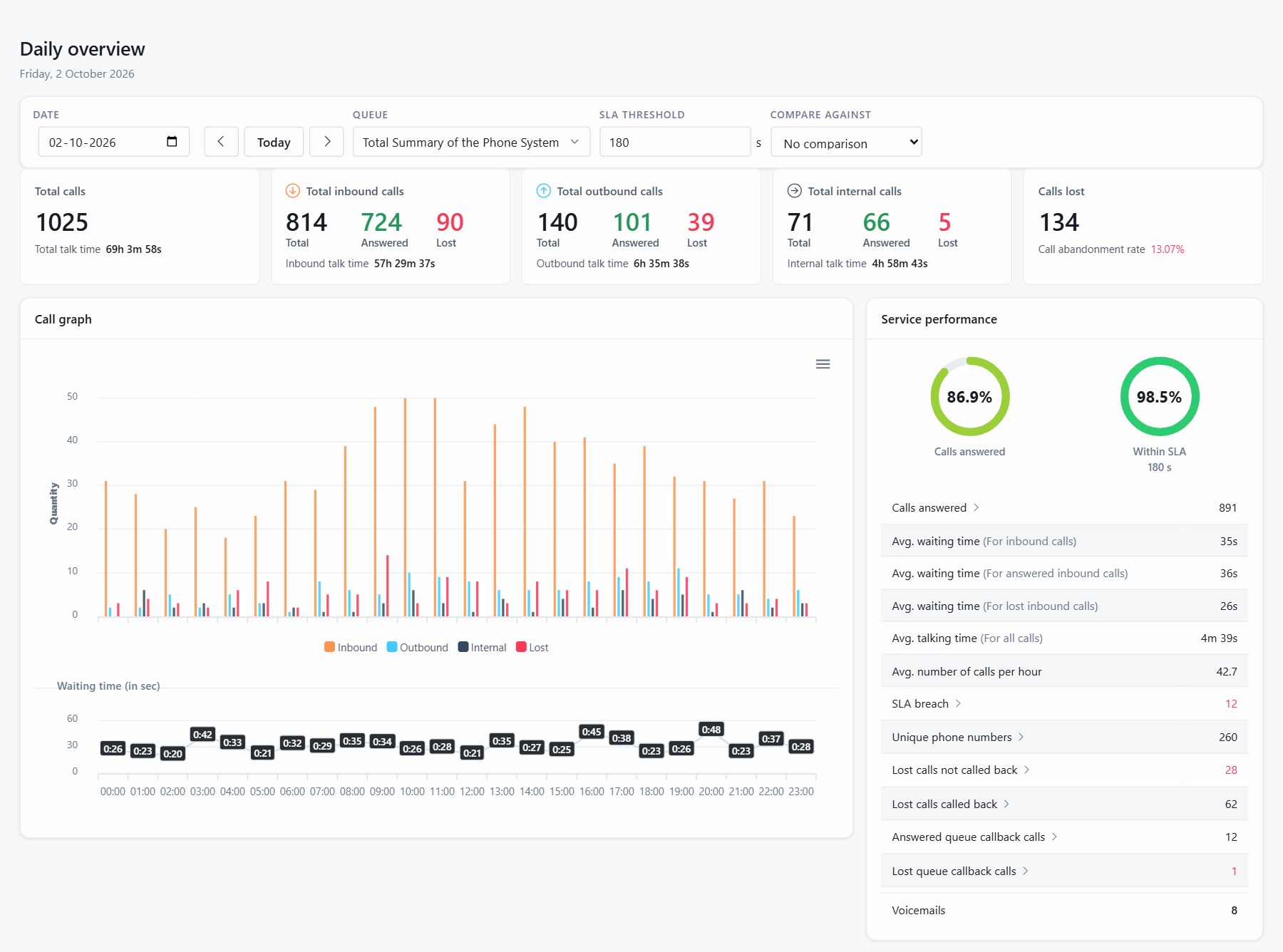
JEDWare · Daily overview
JEDWare daily overview: calls, lost calls, waiting time and the call graph for one day

No firewall changes

The integration on your 3CX server talks securely to the JEDWare API. Nothing to open inbound.

No extra hardware

Statistics are computed on our servers, not on your 3CX. No Power BI, no Grafana, no database of your own.

Always up to date

One-click integration updates. The web app updates itself.

Hosted in the EU

Built in Denmark and hosted in the EU. Log in from anywhere in a browser.

How does it work?

Three parts. Nothing on your desk.

A small integration on the 3CX server, our API cluster in the middle, and a web app you log in to. Updates are one click.

Requires 3CX v20 Update 6 or later, Linux or Windows.

01

Secure 3CX integration

Runs on your 3CX server, Linux or Windows. It executes commands and sends call data securely to the JEDWare API. No firewall changes.

02

JEDWare API cluster

We turn the raw 3CX data into finished statistics. The heavy work happens on our servers, not on your 3CX.

03

JEDWare web application

Log in to see dashboards and wallboards, search reports and schedule deliveries. Nothing to install on the client side.

Your day with JEDWare

See what happened yesterday, and what is happening now

The same 3CX data, four ways to look at it. Explore it live in the browser, or have it delivered.

Dashboard

Every number opens the calls behind it

Everyone gets a personal dashboard the moment they log in. Department managers see their department, and every statistic can be clicked to drill down, all the way to the actual call log.

A collapsible roster shows who is logged into which queue, for how long today, and how everyone is doing against the daily talk-time goal.

Read about Dashboard and departments
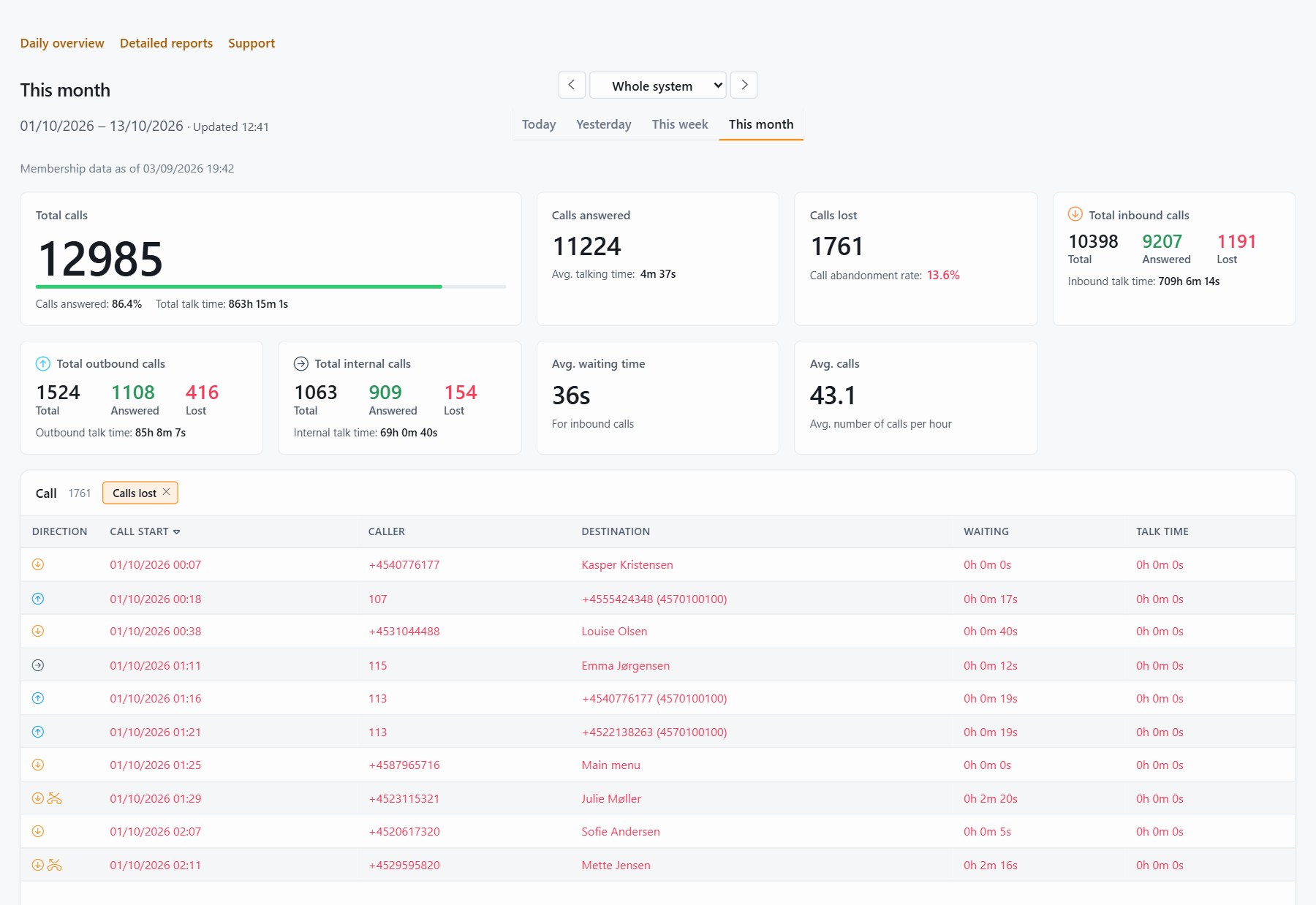
JEDWare · Dashboard
JEDWare dashboard with a drill-down into the calls behind a statistic

Reports

Nine search tabs, one page

Statistics per agent, agent status, queue, queue callback, IVR, department, ring group, free search and from/to. Compare periods in 5, 15, 30 or 60 minute intervals.

Open any call and follow its full call flow: which IVR the caller went through, which queues they waited in, who answered, who transferred, and how it ended.

Read about Reports
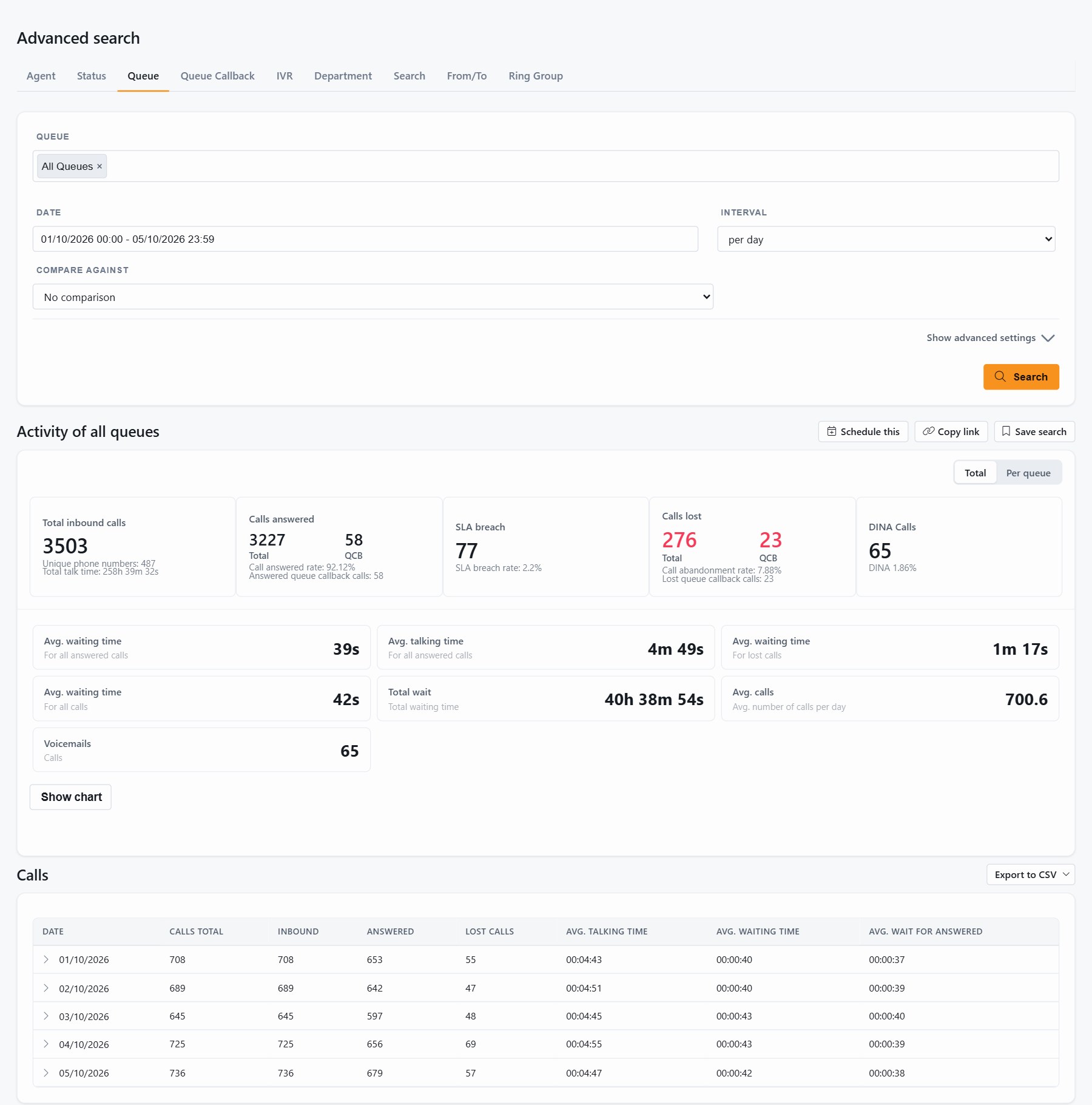
JEDWare · Advanced search
JEDWare advanced search with queue statistics

Daily overview

Your whole day on one page

Totals for any day: inbound, outbound, internal and lost. Calls answered, abandonment rate, talk time, waiting time and calls per hour, with the call graph hour by hour.

Every call is listed below the numbers. Click a row for its call flow, or export the list to CSV.

Read the Daily overview guide
JEDWare · Daily overview
JEDWare daily overview page

Scheduled tasks

Reports that deliver themselves

Decide once what you want to know and when. More than 15 report templates can arrive daily, weekly or monthly as CSV to a directory or by email, or as PDF by email.

The CSV files are made for your own tools. Point Power BI or Excel at the file share. “Run now” creates a report using either the normal time interval or a custom one. Useful when a report has gone missing or you want more control over the time span.

Read the Scheduled tasks guide
JEDWare · Scheduled tasks
JEDWare scheduled reports list

Wallboards

Your queues on the big screen. Live.

Eleven layouts track queues and agents in real time, from one queue in sections to a full call center with up to eight queues in one window.
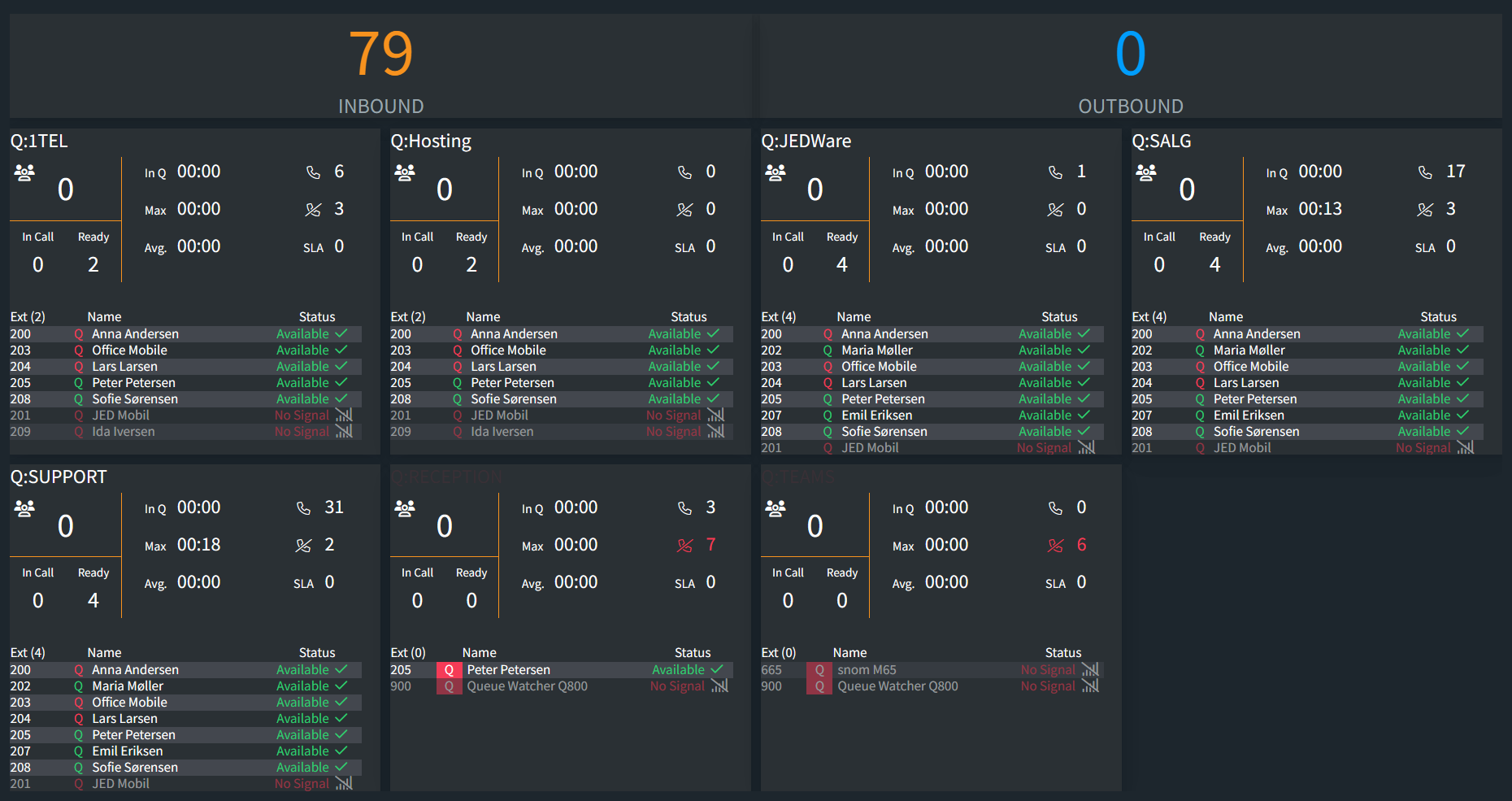
Wallboard · Layout 2 · Multiple queues
JEDWare wallboard layout 2 with several queues, waiting calls and agent status
Share any board to a TV or info screen with a link that needs no login. SLA thresholds change colour, alert sounds warn before a breach, reset schedules can clear yesterday's numbers.See all eleven layouts

Every agent carries a queue icon with their sign-in status. If a queue runs empty, the board shows an alert before callers start hanging up.

Read about Wallboards

See whether JEDWare fits your team

Try it free for 14 days with your own 3CX data. Full access, no credit card.

Built for your team

One login, three views

Managers, agents and admins see what belongs to them. Your 3CX departments carry into JEDWare, so nobody sets up permissions twice.

Department managers

See your department, drill into any number, and get the scheduled reports for your own team without tenant-wide admin rights.

Dashboard and departments


  • Scope follows the 3CX role: managers see their department
  • Click any statistic to reach the call log behind it
  • A department admin page with roster and scheduled reports

Agents

A personal dashboard the moment you log in: your own day, your queues and how you are doing against the daily talk-time goal.

Agent status


  • Time in Available, Break, DND and your own custom statuses
  • Queue login coverage, per queue and agent
  • Live agent status on every wallboard

Admins and partners

Who sees what is your call. Roles decide features, visibility decides queues, IVRs and extensions.

Admin settings


  • Role groups with per-feature access lists
  • Optional two-factor with an authenticator app or email codes
  • Activity log per user and category, 90 days of history

Chat, API and AI

Written conversations and outside tools, same numbers

Live Chat, WhatsApp, Facebook and SMS are measured like calls, per queue and per agent. The same statistics leave the app through the API, into Power BI or Excel, or answered in plain language by Claude or ChatGPT through MCP.

API keys are created in the app, shown once and revocable at any time. JEDWare adds no AI of its own and never sees the conversation.

Live ChatQueue Chat
WhatsAppQueue Chat
FacebookQueue Chat
SMSQueue Chat
Power BICSV or API
ExcelCSV or API
SwaggerAPI docs on your system
JSONNine report endpoints
Claudevia MCP
ChatGPTvia MCP
Cursorvia MCP
MCPAny MCP client

Daily admin, can be done in JEDWare

Small jobs, done in the browser

Caller ID

Change the outgoing Caller ID per extension, directly in the web app.

Read the guide

Prompts

Record or replace queue and IVR prompts in the browser.

Read the guide

Block Number

Block a caller for a set time. It unblocks automatically.

Read the guide

Queue Watcher

Signs a backup agent in and out so no call lands in an empty queue.

Read the guide

Questions

Before you start

What people usually want to know. Anything else, ask us.

How long does it take to get started?

Sign up, install the integration on your 3CX server (Linux or Windows) and log in. The integration sends data from the first minute, and updates are one click from then on.

Does JEDWare overload my 3CX server?

The integration only executes commands and sends call data to the JEDWare API. The heavy work, turning raw data into statistics, happens on our servers, not on your 3CX.

Which 3CX versions are supported?

3CX v20 Update 6 or later, on Linux or Windows.

Where is my data hosted?

In the EU. The integration talks securely to the JEDWare API, and no inbound firewall changes are needed on your side.

Can I show a wallboard on a TV?

Yes. Every wallboard has a share link. Open it on the TV in the office, the info screen in the canteen or a browser tab, and it keeps itself up to date without a login.

Ready to get started?

Make your 3CX numbers work for you

Sign up and try JEDWare for free for 14 days with your own 3CX data. Full access, no credit card.

3CX partner since 2009 · Built in Denmark · Hosted in the EU