Spam caller, robocall, angry customer: block the number for 15 minutes or 7 days from the JEDWare web app. The block lifts itself, nobody has to remember it.
3CX block number without the Management Console
Choose the duration, JEDWare removes the block
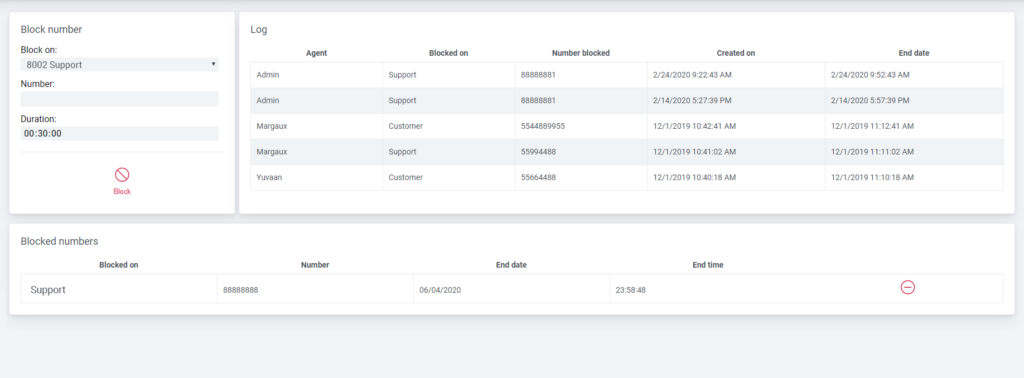
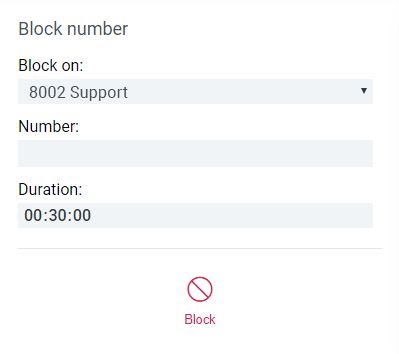
Block Number sits in the JEDWare left menu. Type the number as the caller shows it, pick the scope, pick the duration and click Block. JEDWare writes the block to 3CX and removes it again when the time is up. Nobody needs the 3CX Management Console, and nobody has to remember the block.
Scope. Block the caller from one extension, or from the whole phone system.
Duration. 15 minutes, 1 hour, 4 hours, 24 hours, 7 days, or a custom time in hours and minutes. An administrator can force one fixed duration for every block in Block settings.
Active blocks and history. Active blocks is read live from 3CX, so blocks made in the 3CX admin console show up too, marked Permanent. Unblock lifts a block early. History keeps every block made through JEDWare with who made it, when, and the reason they wrote. Block again repeats a block in one click.
Who may block. A user role needs the Block number feature. Give it to the receptionists and team leaders who take the calls, and keep the permanent 3CX blocklist for the administrator.
3CX block number questions
Can I block a number in 3CX without the Management Console?
Yes. Block Number in the JEDWare left menu writes the block to 3CX and lifts it again by itself. Your JEDWare user role needs the Block number feature, nothing else is required.
How long does a 3CX block number last in JEDWare?
15 minutes, 1 hour, 4 hours, 24 hours, 7 days, or a custom time in hours and minutes. JEDWare removes the block when the time is up. An administrator can force one fixed duration for every block in Block settings.
Can I block a caller for one extension only?
Yes. The scope Extension blocks the caller from a single extension that you choose. Whole phone system blocks the caller everywhere in 3CX.
Does JEDWare show blocks made in 3CX itself?
Yes. Active blocks is read live from the phone system, so a block made in the 3CX admin console appears too, marked Permanent. History keeps every block made through JEDWare with who made it, when, and the reason.