
A live publish changes where a phone number goes. The designer makes that reversible: before every live publish, and before every live call-script deploy that re-points a number, it saves a copy of the routing your numbers have at that moment. Undo last publish puts it back.
What is saved
For each live change the designer stores:
- which numbers (inbound rules) the flow touches,
- the full routing of those numbers as it was, drawn as a flow, the same picture you get from Import from PBX,
- when, by whom, and which publish it belongs to.
The last 20 copies per flow are kept on the PBX host, next to the flow. They survive restarts and integration updates.
Undo last publish
- Open the flow and choose History…. Press Undo last publish at the top (“Puts the phone system back to how it was before the last live publish”).
- The dialog “Undo the last publish” shows what will change: the number goes back to its previous destination, and the menus, queues and smart steps the flow created are deleted. The rule row is highlighted with “This changes what callers hear”.
- Press Undo publish and confirm the second question: “Calls to 44227232 go back to their previous destination as soon as the undo finishes.”
- The undo runs like a publish, with a result per row and a log, and ends with “Publish undone”.
- Afterwards the flow still exists with all its steps, but it is no longer published: the header loses its “Published” stamp and the cards go back to new. The next Publish live creates the objects again.
Things to know:
- Reused 3CX objects (tag 3CX) are never deleted by an undo.
- If something outside the flow points at an object the undo would delete, another receptionist’s key or another number, the dialog stops with “Something outside this flow still points at an object the undo would delete” before changing anything. Fix that destination first.
- After a call-script deploy the undo points the number back at its previous destination. The script itself stays on 3CX, unused; delete it in the Admin Console when you are sure.
- You can go back to an older copy: in the Backups list press Go back to this on that row.
- An undo needs live publishing to be switched on, like a publish. The button is greyed out when there is nothing to undo.
History
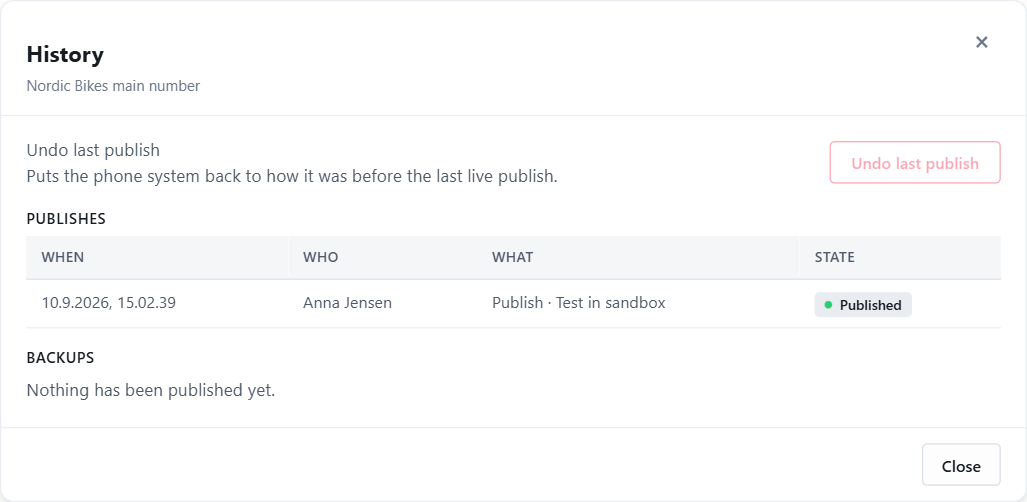
History… on a flow shows two lists.
Publishes. Every publish, sandbox test and undo the integration has run since it last restarted: when, who, what (Publish or Undo, and Test in sandbox or Publish live) and its state. The step-by-step log of a run is shown while it runs; use Copy log then if support needs it. After an integration restart this list starts empty; the backups do not.
Backups. The saved copies, newest first, with the numbers they cover and who triggered the publish. Download saves the copy as a JSON file; Go back to this undoes to that point.
Who did what
Every save, sandbox test, live publish, deploy and undo records the signed-in user. The flow list shows who last updated a flow; the flow header shows “Published … by Name” and “Sandbox test … by Name”; the call-script dialog shows who deployed; the history lists show the user per entry; and the integration’s own log on the PBX host records the same. If a JEDWare staff member works through your account, the entry says so.
Next: Running a flow as a call script if you use call scripts, otherwise Who can use the Call Flow Designer.