
Public holidays move. Easter, Ascension and Whit Monday get new dates every year, and someone has to type them into every department in the 3CX Admin Console every autumn. Hours & holidays does it in a minute for 39 countries, or from any calendar file.
From a country calendar
- Click Add a year.
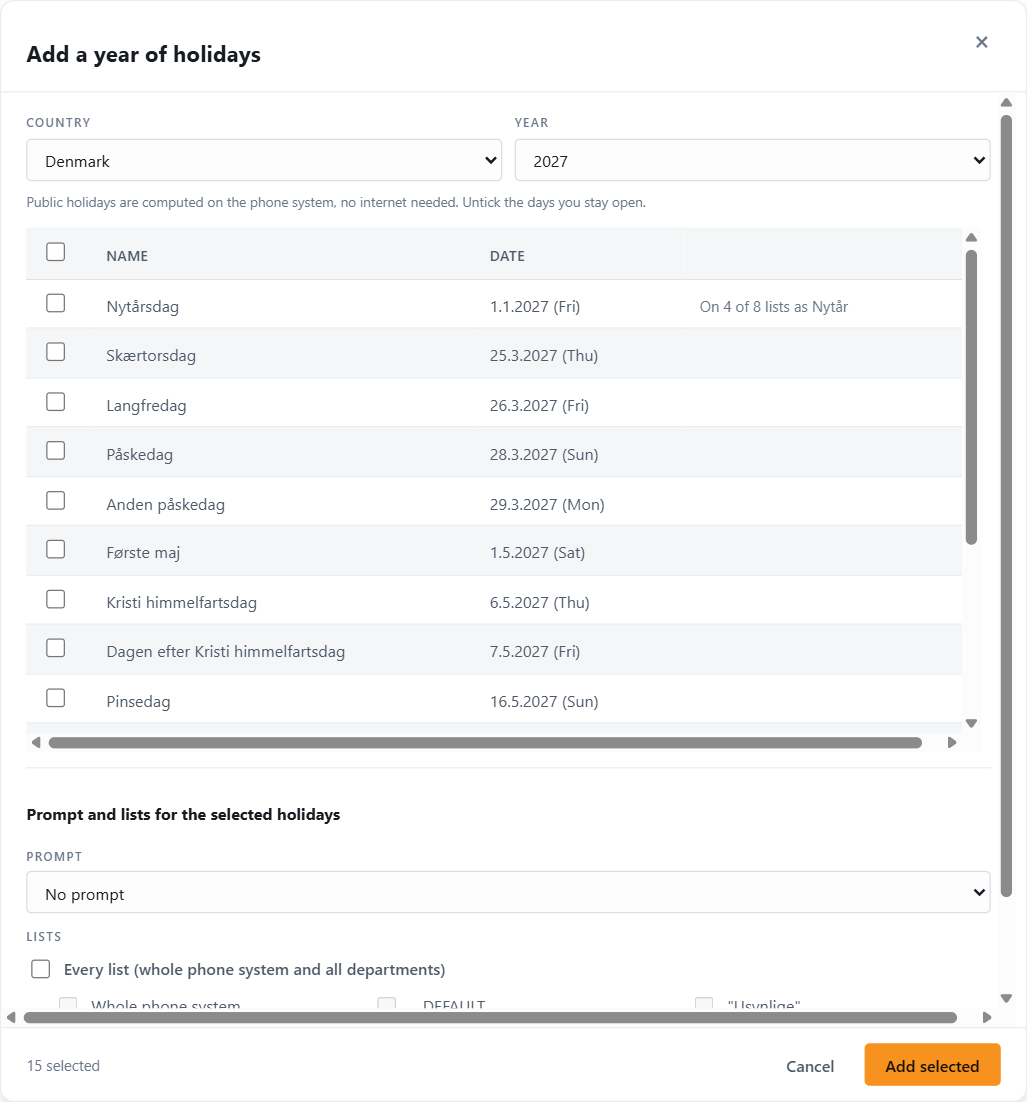
- Pick the Country and the Year. Next year is preselected, and the page remembers the country you used last time. The holidays load as soon as you change either.
- The list shows every public holiday of that country and year in the country’s language, with the date and weekday. For Denmark 2027: Nytårsdag, Skærtorsdag, Langfredag, Påskedag, Anden påskedag, Første maj, Kristi himmelfartsdag, …
- Each row is checked against what your 3CX already has on that date:
- Already there as Nytår: every list has a holiday on that date. The row is greyed and unticked. The name in italics is the name 3CX uses, which may differ from the calendar’s.
- On 6 of 9 lists as Juleaften: some lists have it. The row is ticked; adding it creates the copy only on the lists that lack it.
- No note: no list has it. Ticked.
- Untick the days you stay open. Optional and regional days are included on purpose so that you can decide: Denmark lists Grundlovsdag, Første maj, the day after Ascension, Christmas Eve and New Year’s Eve.
- Under Prompt and lists for the selected holidays, choose the prompt callers will hear on those days (one for all rows) and the lists (Every list or a selection).
- Press Add selected. The footer shows how many rows are ticked.
The message sums it up: Added 27 copies across 9 lists, 0 already there. Identical entries that were already on a list are skipped, so running it twice does no harm.
Countries: Austria, Australia, Belgium, Brazil, Croatia, Czechia, Denmark, Estonia, Finland, France, Germany, Greece, Hungary, Ireland, Italy, Japan, Kazakhstan, Lithuania, Luxembourg, Mexico, Montenegro, Netherlands, New Zealand, Norway, Poland, Portugal, Romania, Serbia, Slovakia, Slovenia, South Africa, Spain, Sweden, Switzerland, Turkey, United Kingdom (England & Wales, Scotland and Northern Ireland separately) and the United States (federal). The calendars are computed on the phone system itself; no internet connection is needed.
From a calendar file (.ics)
For countries not in the list, for regional days, for school holidays, or for the closure calendar your HR department already keeps:
- Export the calendar as an
.icsfile. Google Calendar, Outlook, Apple Calendar and most HR tools can, and most governments publish one. - Click Import .ics and choose the file (up to 4 MB).
- Whole-day events become one row each, multi-day events become a range, and timed events count for their day. Repeating events (yearly rules) are skipped; the dialog says how many, add those once as every-year holidays by hand.
- From here it is the same checklist as above: untick, choose prompt and lists, Add selected.
What gets created
Everything you add this way is created as a one-off holiday for that year, including fixed-date days like Christmas. That is deliberate: it keeps the yearly job simple and predictable.
- Holidays you already keep as every year entries (Christmas Eve on 24 Dec, say) are found by their date and unticked, so they are not doubled.
- Next autumn, run Add a year again for the following year. The movable days get their new dates; the fixed ones are found and skipped.
- The previous year’s one-off entries turn stale on 1 January. Press Remove stale to drop them (see The holiday list).
If you would rather keep Christmas and New Year as every-year entries, add them once with Add holiday and Every year; from then on the yearly run leaves them unticked.
After adding
Look at the table with the filter on a department and check that the year looks right. The Right now tiles show the next holiday for each department, which is a quick way to see that every list got it.