
JEDWare philosophy for 3CX reporting
3CX has built-in reports that suit many customers, but not all. JEDWare reads the raw 3CX call data through the 3CX API, never writes to
Scheduled CSV reports deliver your 3CX call data as files, ready for Excel, Power BI or any other tool that reads CSV. A scheduled task runs hourly, daily, weekly or monthly, and the file is sent by email or uploaded to a folder, so a Power BI dataset or a shared drive is refreshed without anyone logging in.
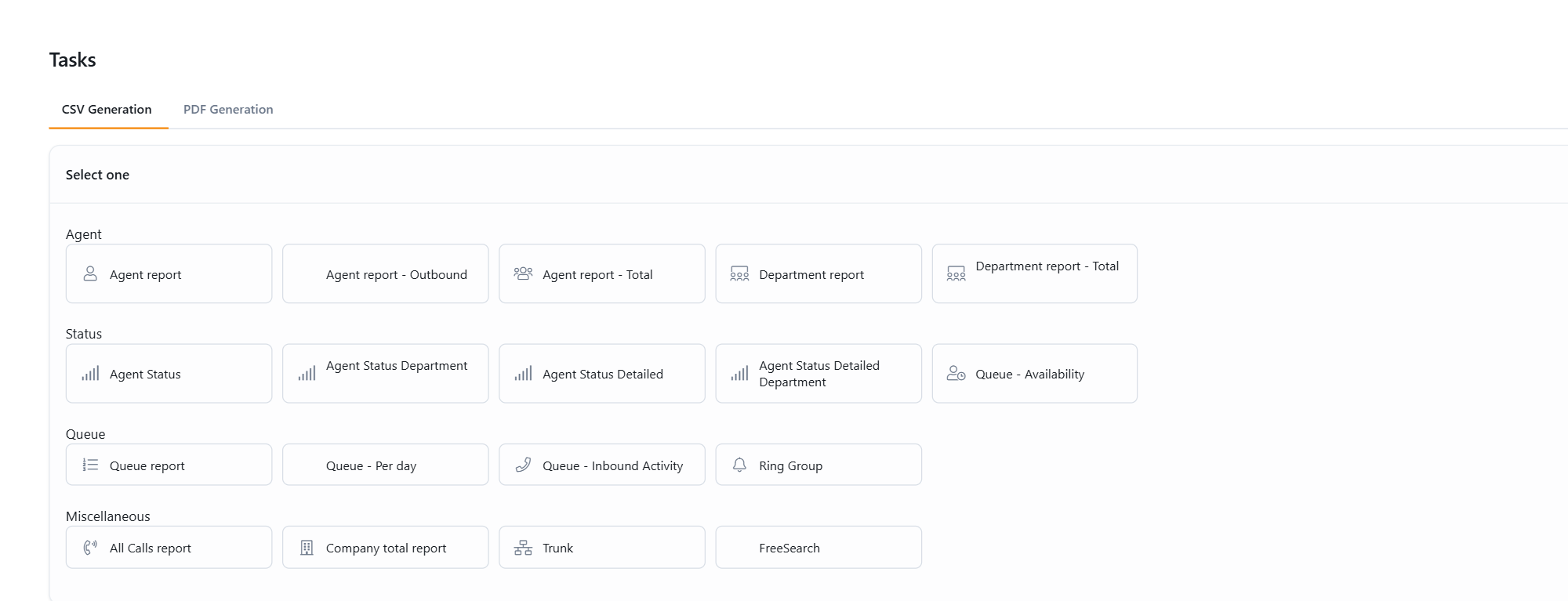
The same report templates as the PDF reports are available as CSV: Agent, Agent Outbound and Agent Total, Group and Group Total for departments, Agent Status with its Group and Detailed variants, Queue, Queue Availability, Queue Inbound Activity and Queue Per Day, All Calls, Ring Group, Trunk and Company total. Each template has its own guide below with the settings and the columns the file contains.
Scheduled tasks are created under Report, Scheduled tasks in the left menu: choose the template, the period, the agents or queues, the schedule and the delivery. The overview guide, Scheduled CSV reports for Excel or Power BI, explains the common settings once, and the two background pages on report limits and the JEDWare reporting philosophy apply to the CSV files as much as to the reports on screen.
For the sales-side overview of 3CX reports with JEDWare, see the feature page.
3CX has built-in reports that suit many customers, but not all. JEDWare reads the raw 3CX call data through the 3CX API, never writes to
With Scheduled tasks, JEDWare creates CSV files from your 3CX call data on its own: hourly, daily, weekly or monthly. The file is emailed to
JEDWare has no limit on how many calls a report can count. The Call log table stops at 25,000 rows, but every call is still
JEDWare Agent Report This Agent report will contain: ExtensionId, FullName, InboundAnswered, InboundLost, OutgoingAnswered, OutgoingLost, InternalAnswered, InternalLost, TotalAnswered, TotalLost, AnsweredProcent, LostProcent, TotalTalkTime, AverageTalkTime The CSV end
JEDWare Agent Report – Outbound This report will contain: ExtensionId, FullName, OutboundAnswered, OutboundTalkTime, OutboundAverageTalkTime, OutboundLost, OutboundTotal, OutboundPercentageAnswered, OutboundPercentageLost, InternalAnswered, InternalTalkTime, InternalLost, InternalPercentageAnswered, InternalPercentageLost, TotalAnswered, TotalLost,
JEDWare Agent Report – Total This Agent report will contain:ExtensionID, FullName, InboundAnswered, InboundTalkTime, InboundAverageTalkTime, InboundLost, InboundTotal, InboundAnswerPercentage, InboundLostPercentage, OutboundAnswered, OutboundTalkTime, OutboundAverageTalkTime, OutboundLost, OutboundTotal, OutboundAnswerPercentage, OutboundLostPercentage,
JEDWare Group Report This report will contain: ExtensionID, FullName, InboundAnswered, InboundLost, OutgoingAnswered, OutgoingLost, InternalAnswered, InternalLost, TotalAnswered, TotalLost, TotalAnsweredLost, AnsweredPercent, LostPercent, TotalTalkTime, AverageTalkTime The CSV end
JEDWare Group Report – Total This report will contain:ExtensionID, FullName, InboundAnswered, InboundTalkTime, InboundAverageTalkTime, InboundLost, InboundTotal, InboundAnswerPercentage, InboundLostPercentage, OutboundAnswered, OutboundTalkTime, OutboundAverageTalkTime, OutboundLost, OutboundTotal, OutboundAnswerPercentage, OutboundLostPercentage, InternalInboundAnswered,
JEDWare Agent Status Report This report will contain: ExtensionId, FullName, Available, Break DND, Custom 1, Custom 2, Total The CSV end result for a JEDWare
JEDWare Agent Status Group Report This report will contain: ExtensionId, FullName, Available, Break DND, Custom 1, Custom 2, Total The CSV end result for a
JEDWare Agent Status Detailed Report This report will contain: ExtensionId, FullName, Status, Start, End, Duration The CSV end result for a JEDWare Agent Status Detailed
JEDWare Agent Status Detailed Group Report This report will contain: ExtensionId, FullName, Status, Start, End, Duration. The CSV end result for a JEDWare Agent Status
JEDWare Queue – Availability Report This report will contain: Queue, ExtensionId, FullName, Logged in, Logged out. The CSV end result for a JEDWare Queue –
JEDWare Queue Report This Queue report will contain: QueueExt, Agent Ext, Name, Calls, Wait Time, AWT, Ans in Q, Total Talk Time, Average Talk Time,
JEDWare Queue – Per day Report This Queue report will contain: Date, Inbound, Answered, Lost, DINA, Total Talk, Answer %, Lost / Under, Lost /
JEDWare Queue – Inbound Activity Report This Queue – Inbound Activity report will contain: Interval, Direction, CallStart, CallEnd, Wait Time, Talk Time, Caller, Destination, Answered.
JEDWare Ring Group Report This Ring Group report will contain: Ring group Ext, Agent Ext, Name, Calls, Wait Time, AWT, Ans in Q, Total Talk
JEDWare All Calls Report This report will contain: is_answered, direction, start_date, start_time, end_date, end_time, ring time, talk time, caller name, caller number, destination name, destination
JEDWare Trunk Report This report will contain: TrunkID, TrunkName, DID, Total, Answered. The CSV end result for a JEDWare Trunk Report, when imported to Excel,
JEDWare Company total Report This report will contain: TotalIndbound, TotalOutbound, TotalInternal, AnsweredCalls, LostCalls, TotalInboundTime, TotalOutboundTime, TotalInternalTime, AvgWaitTime, AvgTalkTime. The CSV end result for a JEDWare