
Reports

3CX Custom Reports, the JEDWare way

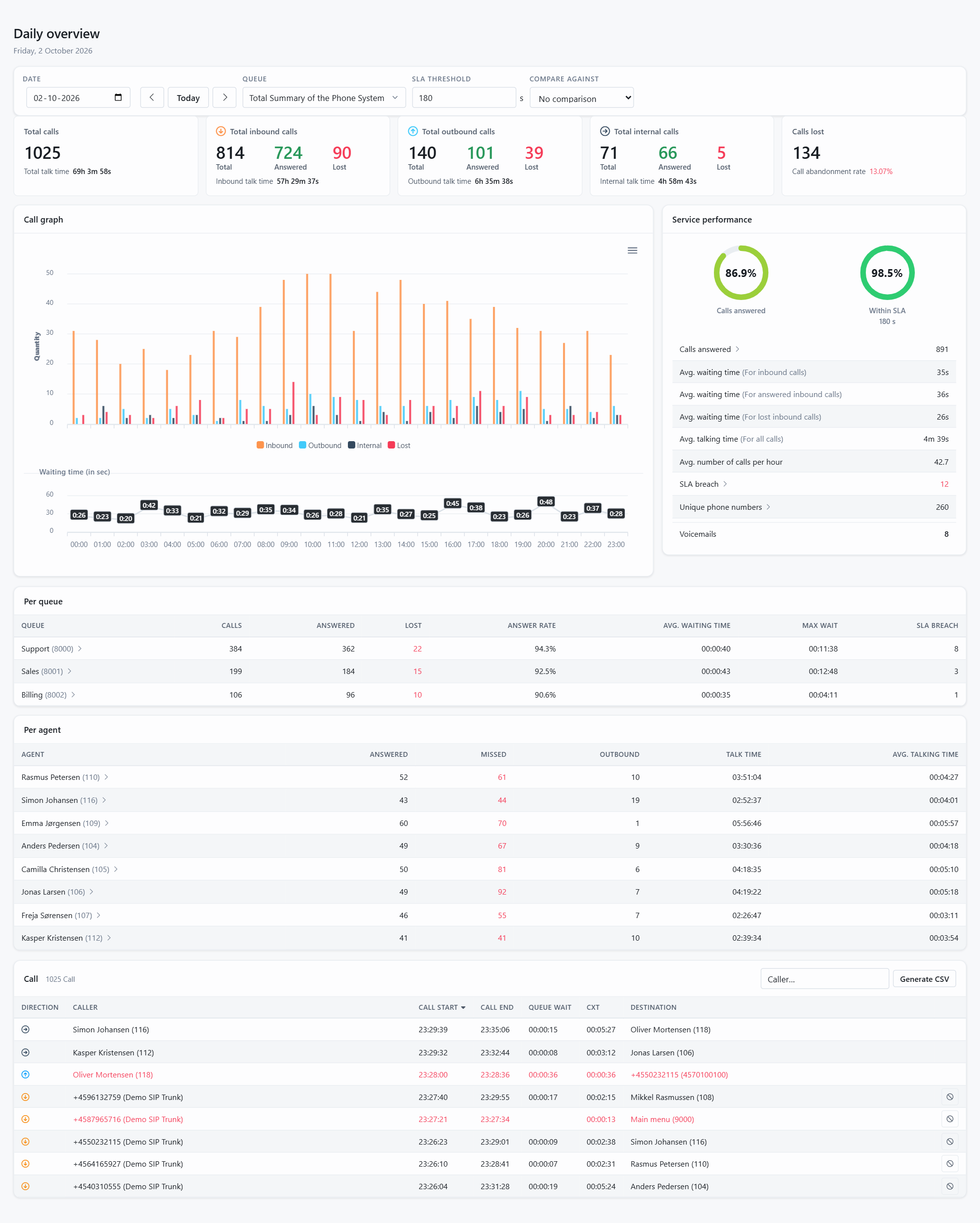
JEDWare reports turn the raw call data of your 3CX into answers. The Report menu has three parts: Daily overview, the live picture of today with totals, service performance, the call graph hour by hour and every call of the day; Advanced search, where you pick a report type, a period and an interval and dig into the details; and Scheduled tasks, where the same reports are sent by email as PDF or CSV on a schedule.

Advanced search has nine report tabs. The agent report shows activity per extension, the queue and IVR report shows SLA breaches, lost and DINA calls and waiting times, the department report groups extensions the way 3CX does, the agent status report counts the time in Available, Break, DND and custom statuses, and the free search finds every call from a number or a name. Intervals run from one minute to a day, and every report can be compared against another period.

Two background guides explain why the figures look the way they do. The JEDWare philosophy for 3CX reporting describes how we work from raw 3CX data and apply our own rules for abandoned calls and agent credit, with agent-specific data switched on by default. Limits and tips explains that there is no call limit, what happens during a long search, and that the call log table prints the first 25,000 calls.

The guides below cover each report type, the Daily overview, the Department page for supervisors, and how to export a result to CSV.

For the sales-side overview of 3CX reporting with JEDWare, see the feature page.

The Department page and scheduled reports

Supervisors and department administrators get a Department page in the menu. It collects what a department manager needs without requiring full administrator access. What’s on the page Members: the department’s roster, as registered in 3CX. Shown when your 3CX role grants the “can see group members” right. The list is

Read More »

JEDWare philosophy for 3CX reporting

3CX has built-in reports that suit many customers, but not all. JEDWare reads the raw 3CX call data through the 3CX API, never writes to the 3CX database, and applies its own rules when it calculates and presents the numbers. That is why a JEDWare report and a 3CX report

Read More »

Limits and tips for the JEDWare reports

JEDWare has no limit on how many calls a report can count. The Call log table stops at 25,000 rows, but every call is still in the totals and the CSV export. The practical limits are the resources of your 3CX server, which delivers the call data, and of the

Read More »

How to use the JEDWare Reports

The Report menu has three parts: Daily overview: one page that sums up a single day, today by default: totals, service performance, the call graph hour by hour, and every call with its call flow. Advanced search: detailed reports for any period, in nine tabs: Agent, Agent status, Queue, Queue

Read More »

Report type: Daily Overview

The Daily overview sums up one day of your phone system on a single page. It opens on today and follows the day live; pick any other date at the top, and pick a queue to see only that queue instead of the whole system. What is on the page

Read More »

Report type: Advanced Search

Advanced search is where the deeper questions get answered. Pick a report tab, a period and an interval, choose the agents, queues or departments you care about, and drill into the result. The nine tabs: Agent, Agent status, Queue, Queue Callback, IVRs, Department, Search (free text), From/To and Ring Group.

Read More »

Report type: AGENT Search

The Agent tab reports on one or more extensions: how many calls they handled, answered and lost, inbound and outbound, and how long they talked. Open Report, Advanced search and make sure Agent is selected in the tab strip. Type in one or more extensions or names, or ALL for

Read More »

Report type: AGENT STATUS Search

The Agent status tab shows how agents spent their time: seconds in Available, Break, DND and your own custom statuses, and how long each agent was logged into each queue. Open Report, Advanced search and select Agent status. Choose whether to search by extension, queue or department, then type in

Read More »

Report type: QUEUE/IVR Search

The Queue tab reports on one or more 3CX queues: inbound calls, calls answered, SLA breaches, calls lost and DINA calls, with waiting times and talk times. IVRs have their own tab with the same layout. Open Report, Advanced search and select Queue (or IVRs). Type in one or more

Read More »

Report type: Department search

The Department tab (called Group in older versions) reports on a whole 3CX department at once: everyone in the department, without picking the extensions one by one. Departments come from your 3CX and are synchronized automatically; see How Departments work in JEDWare. Open Report, Advanced search and select Department. Pick

Read More »

Report type: FREE SEARCH

The Search tab is a free-text search across callers, destinations and names. Use it when a customer insists they called 27 times last week and never got through: type their number and the report shows every attempt and what happened to each one. Open Report, Advanced search and select Search.

Read More »

Table of Contents